
Adopting AI in your practice: methods, Cartes.archi and the SuperArchi connector
Archive of the newsletter sent on 16/07/2026. Announcements and offers reflect that date.
It's been hot this week, but AI hasn't taken a holiday.
Four topics in this edition of Future Architecture:
- Method: where to start with AI in your practice and which tools to choose.
- Tool: bringing urban planning information together.
- SuperArchi: managing projects from Claude through its connector.
- Claude skills: one hundred ready-to-use skills for architecture.
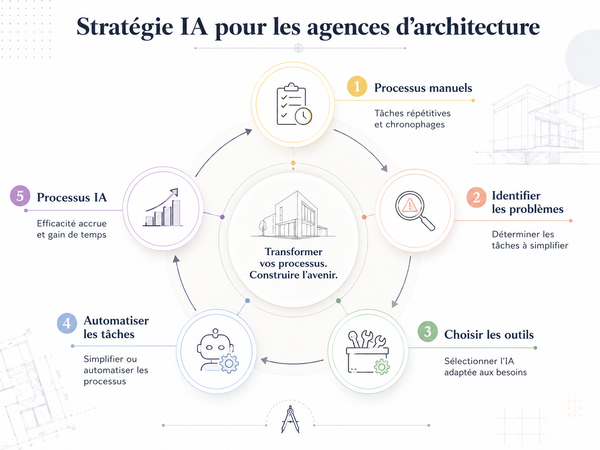
Method: how should you adopt AI in your practice?
A practice contacts me for AI training. That's the request I hear most often.
Training is a good start, but on its own, it isn't enough to produce a major productivity gain.
AI is broad and closely tied to your tools, methods and processes. Advice that suits one practice may be useless to another that works differently.
Before diving into tools, I suggest an actionable audit.
I interview the people in the practice: partners and those doing the work at each stage. Then I bring three things together: your actual processes, where time is being lost and what AI technology can realistically do.
That produces a map of possible actions.
Sometimes the solution is a set of skills matching your process. Sometimes it's an existing tool, and sometimes a bespoke application developed with you.
Sometimes it isn't AI at all: a conventional approach does the job.
An audit left in a drawer is no use. An outside perspective that turns findings into practical proposals can help avoid chaotic adoption without benefits.
👉 Email me if you'd like to apply this method to your practice.
A tool for urban planning information and a site's 3D context
At the start of a project, you choose a plot and need the local planning rules, cadastral information and relevant regulations before a feasibility study can begin.
The information exists, but assembling it is often painful. A local plan may be spread across separate documents, leaving you to piece it together.
I discovered Cartes.archi, which addresses that problem. Enter an address and it brings together:
- The cadastral plan in PDF and DXF.
- Planning zones and regulatory documents.
- The Géorisques risk report.
- The history of planning permissions.
- Recent property transactions on and around the plot.
- An energy performance certificate, where available.
- A 3D terrain model for import into your software.
The tool was developed by Steven Guigoz, another architecture AI trainer, with his brother. He presents it in this LinkedIn post.
It isn't the only tool addressing this problem, but I find its approach intelligent. The beta has just launched and is free during testing. Steven is looking for architects to try it on real projects and explain what is missing.
I manage SuperArchi from Claude
It's been a busy week for SuperArchi, including improvements to meetings and reports.
The biggest update is the AI connector, or MCP.
MCP lets a general-purpose AI such as Claude or ChatGPT connect to another tool: Gmail, a newsletter platform or now SuperArchi.
You can carry out many of the actions you would otherwise do in the interface directly from your chatbot.
For example, after a meeting, dictate what happened into Claude or paste in a transcript and ask for a summary. That summary becomes a source in a SuperArchi meeting, from which you can produce a detailed PDF report.
You can also update a schedule or add tasks to your projects.
I already use it every day to connect the flexibility of a conversation with structured project data:
- Discuss strategy with Claude.
- Turn the discussion into a task list.
- Send the tasks to SuperArchi.
I can have the conversation on my phone on the way to work, while the resulting tasks are filed correctly, project by project.
One hundred ready-to-use Claude assistants for architecture
The skills pack is a ready-to-use library designed to help you stop rewriting prompts for every task and make your approach more systematic.
It moves you from improvised conversations to defined processes AI can follow.
The pack evolves, with updates included at no extra cost. I work with practices to improve it through their feedback.
It will never replace skills tailored to your own practice, but it gives you a starting point you can use quickly and adapt.
Seventy practices already use it, and I'm happy to help them improve their use of AI.
👉 Discover the Claude skills pack.
Sébastien Lucas — Future Architecture
I help you put AI into practice: less administration, better projects. More than five hundred architects trained.
Questions? Email me.