
Future Architecture
Learn AI▼Resources▼AI Watch▼Tools▼
Future Architecture
Future Architecture
Future Architecture

The community of architects learning AI by doing — to spend less time on admin and more on design.

AI for AEC

  • AI Tools
  • AI Use Cases
  • AI Concepts
  • AI Tutorials

Learn & Practice AI

  • Courses
  • Workshops
  • Webinars
  • Memberships
  • Clients and partners
  • Claude Skills

Future Architecture

  • Support Future Architecture
  • Subscribe on YouTube
  • Connect on LinkedIn
  • Follow on Instagram

SuperArchi

  • AI Meeting Minutes
  • AI Tender Management
  • AI Knowledge Base
  • AI Price Database

Legal

  • Terms of Sale
  • Legal Notice
  • Privacy Policy
  • Refund Policy
  • Cookie Policy

© 2026 Future Architecture. All rights reserved.

Connect:

← Back to blog posts

Astra built my 3D model on its own!
Sep 11, 2026
Astra built my 3D model on its own!

Archive of the newsletter sent on 11/09/2026. Announcements and offers reflect that date.

Something remarkable is happening with AI in architecture. If there is a moment for architects to start taking it seriously, I think this is it.

AI is beginning to understand our drawings, help with design and draw directly in our software. In other words, it is starting to take on some of the work we do every day.

In this newsletter:

  • Astra built my 3D model on its own: a look at my latest video test.
  • Are we reaching a turning point for architects? I think so, and I'll explain why.
  • Next week's AI workshop: working together on practical ways to integrate AI into a practice.

1. Astra built my 3D model on its own

This week, I made a video testing the new capabilities of ChatGPT 6 Astra. I think it could have a particularly significant impact on architects for two reasons.

The first is spatial understanding: its ability to understand plans, sections and complex geometry. The second is computer use: its ability to operate your computer directly and use the same software you do.

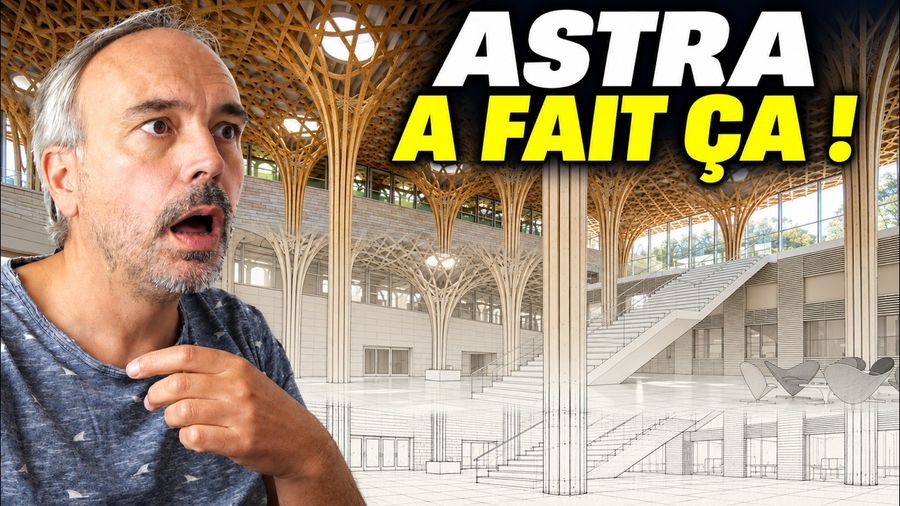
For my first test, I started with a Shigeru Ban project with a fairly complex structure. I asked Astra to find the information it needed online. It found photos, plans and dimensioned sections, then I asked it to reconstruct the geometry in Rhino.

The first version was reasonable, but probably not easy to edit. It mainly used meshes, which made the geometry difficult to rework cleanly.

So I asked it to try another approach.

It created a small web application to visualise the structure in 3D, with sliders to change the geometry. That really impressed me.

It opens up another possibility: AI doesn't necessarily have to use existing software. It can create the tool it needs to work on a project.

👉 Watch my Astra demonstration on YouTube

2. Are we reaching a turning point for architects?

This morning, I saw a demonstration that went even further.

An AI specialist I met in Barcelona last year showed a complete workflow: from drawings to 3D, from 3D to a rendering, then from the rendering to client presentation slides. The result was very good.

Naturally, I wanted to test it again.

I pulled out the construction drawings for a house I designed for my parents a few years ago. I had modelled it several times in SketchUp without ever really finishing the 3D. As often happens, the project changes, the drawings evolve and the model falls behind.

I gave Astra the drawings. Around ten minutes later, the house had been modelled in Rhino.

I haven't measured everything to check its accuracy down to the centimetre, but visually, it is almost perfect. It even reproduced some metal flashing details from photos that I hadn't necessarily drawn precisely.

For me, that is an important moment.

Until now, there were two major barriers. The first was spatial understanding: could a general-purpose AI really understand a plan, a section and photos, and correctly reconstruct a building? In this test, I feel we crossed a threshold.

The second was access to our software. Revit, Archicad, AutoCAD, Rhino: connecting them to AI through APIs, scripts or MCP was already possible, but remained quite technical.

With computer use, that barrier is also starting to fall. AI can operate your computer: open software, click, enter commands, inspect the result, correct it and continue.

Combine those abilities and you can see why I think our way of working could change profoundly.

I've already experienced this shift in software development. Over the past year and a half, my approach has changed completely. Today, I develop mainly with AI. My work hasn't disappeared; I still have plenty to do. But I can achieve in hours what used to take days. Sometimes I work ten or twenty times faster.

Until now, architects hadn't really experienced an equivalent change. AI could help write an email, analyse a document or produce meeting minutes, but couldn't really take over what we were doing in Revit, Archicad or Rhino.

I think that is precisely what is changing.

My advice is simple: test it. Take an old project you know well. Give AI your drawings and ask it to reconstruct it. Look at what it understands, what it gets wrong and how far it can go. There will obviously be limitations, and now is the time to discover them.

Share your thoughts in the LinkedIn discussion

3. Free AI workshop on 17 September: identify use cases for your practice

As AI's capabilities develop, it becomes more urgent to think about how to integrate it into the organisation of your practice.

I often see the same situation: a prompt in ChatGPT, a test in Claude, an interesting conversation nobody can find again, or a result that works once but cannot be reproduced.

The result is a sense of chaos: using AI without really mastering it or seeing the expected time savings.

For me, the next step is to move from isolated tests to AI workflows integrated into the practice. That is what we'll work on during my free workshop on 17 September. More than fifty people have already signed up.

I'll first present the method I use to structure AI adoption. Then we'll map real architectural tasks and identify the use cases where AI could bring the most value.

We'll prioritise them using two criteria:

  • What impact could they have on the practice?
  • How difficult are they to implement?

Then we'll break down one use case: what information is needed, what the steps are, what we delegate to AI, what we check and what deliverable we expect.

The aim is to move from "I use ChatGPT occasionally" to "This is how AI works in my practice."

Claude or ChatGPT, skills, connectors and safeguards all have a part to play, but above all, you need a method you can reuse and improve. Less time searching for information, copying it, producing reports or chasing contractors. More time designing.

👉 Register for the free workshop on 17 September

Sébastien

Questions? Email me.

Sébastien Lucas — Future Architecture

I help architects save time with AI, not replace them!

Most popular pack

Your AI assistants for architects, ready to use

The AI Assistants for Architects pack bundles our best prompts and workflows for Claude, Midjourney, and Revit.

← Back to blog posts

Astra built my 3D model on its own!

Sep 11, 2026
Astra built my 3D model on its own!

Archive of the newsletter sent on 11/09/2026. Announcements and offers reflect that date.

Something remarkable is happening with AI in architecture. If there is a moment for architects to start taking it seriously, I think this is it.

AI is beginning to understand our drawings, help with design and draw directly in our software. In other words, it is starting to take on some of the work we do every day.

In this newsletter:

  • Astra built my 3D model on its own: a look at my latest video test.
  • Are we reaching a turning point for architects? I think so, and I'll explain why.
  • Next week's AI workshop: working together on practical ways to integrate AI into a practice.

1. Astra built my 3D model on its own

This week, I made a video testing the new capabilities of ChatGPT 6 Astra. I think it could have a particularly significant impact on architects for two reasons.

The first is spatial understanding: its ability to understand plans, sections and complex geometry. The second is computer use: its ability to operate your computer directly and use the same software you do.

For my first test, I started with a Shigeru Ban project with a fairly complex structure. I asked Astra to find the information it needed online. It found photos, plans and dimensioned sections, then I asked it to reconstruct the geometry in Rhino.

The first version was reasonable, but probably not easy to edit. It mainly used meshes, which made the geometry difficult to rework cleanly.

So I asked it to try another approach.

It created a small web application to visualise the structure in 3D, with sliders to change the geometry. That really impressed me.

It opens up another possibility: AI doesn't necessarily have to use existing software. It can create the tool it needs to work on a project.

👉 Watch my Astra demonstration on YouTube

2. Are we reaching a turning point for architects?

This morning, I saw a demonstration that went even further.

An AI specialist I met in Barcelona last year showed a complete workflow: from drawings to 3D, from 3D to a rendering, then from the rendering to client presentation slides. The result was very good.

Naturally, I wanted to test it again.

I pulled out the construction drawings for a house I designed for my parents a few years ago. I had modelled it several times in SketchUp without ever really finishing the 3D. As often happens, the project changes, the drawings evolve and the model falls behind.

I gave Astra the drawings. Around ten minutes later, the house had been modelled in Rhino.

I haven't measured everything to check its accuracy down to the centimetre, but visually, it is almost perfect. It even reproduced some metal flashing details from photos that I hadn't necessarily drawn precisely.

For me, that is an important moment.

Until now, there were two major barriers. The first was spatial understanding: could a general-purpose AI really understand a plan, a section and photos, and correctly reconstruct a building? In this test, I feel we crossed a threshold.

The second was access to our software. Revit, Archicad, AutoCAD, Rhino: connecting them to AI through APIs, scripts or MCP was already possible, but remained quite technical.

With computer use, that barrier is also starting to fall. AI can operate your computer: open software, click, enter commands, inspect the result, correct it and continue.

Combine those abilities and you can see why I think our way of working could change profoundly.

I've already experienced this shift in software development. Over the past year and a half, my approach has changed completely. Today, I develop mainly with AI. My work hasn't disappeared; I still have plenty to do. But I can achieve in hours what used to take days. Sometimes I work ten or twenty times faster.

Until now, architects hadn't really experienced an equivalent change. AI could help write an email, analyse a document or produce meeting minutes, but couldn't really take over what we were doing in Revit, Archicad or Rhino.

I think that is precisely what is changing.

My advice is simple: test it. Take an old project you know well. Give AI your drawings and ask it to reconstruct it. Look at what it understands, what it gets wrong and how far it can go. There will obviously be limitations, and now is the time to discover them.

Share your thoughts in the LinkedIn discussion

3. Free AI workshop on 17 September: identify use cases for your practice

As AI's capabilities develop, it becomes more urgent to think about how to integrate it into the organisation of your practice.

I often see the same situation: a prompt in ChatGPT, a test in Claude, an interesting conversation nobody can find again, or a result that works once but cannot be reproduced.

The result is a sense of chaos: using AI without really mastering it or seeing the expected time savings.

For me, the next step is to move from isolated tests to AI workflows integrated into the practice. That is what we'll work on during my free workshop on 17 September. More than fifty people have already signed up.

I'll first present the method I use to structure AI adoption. Then we'll map real architectural tasks and identify the use cases where AI could bring the most value.

We'll prioritise them using two criteria:

  • What impact could they have on the practice?
  • How difficult are they to implement?

Then we'll break down one use case: what information is needed, what the steps are, what we delegate to AI, what we check and what deliverable we expect.

The aim is to move from "I use ChatGPT occasionally" to "This is how AI works in my practice."

Claude or ChatGPT, skills, connectors and safeguards all have a part to play, but above all, you need a method you can reuse and improve. Less time searching for information, copying it, producing reports or chasing contractors. More time designing.

👉 Register for the free workshop on 17 September

Sébastien

Questions? Email me.

Sébastien Lucas — Future Architecture

I help architects save time with AI, not replace them!

Most popular pack

Your AI assistants for architects, ready to use

The AI Assistants for Architects pack bundles our best prompts and workflows for Claude, Midjourney, and Revit.